Minimalist vs. Bold Web Design
Posted on: 2026-06-09
By: Elena Rivers
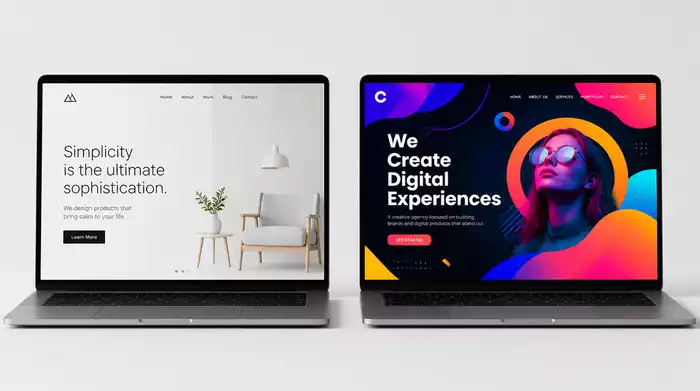
Bold web design and minimalist design each tell a unique story of how we can engage users. Did you know that the choice of design style can significantly influence the user experience? Understanding these styles will empower you to create websites that resonate with your audience and achieve your goals.
What You Will Learn
- Minimalist design prioritizes clarity, simplicity, and functionality, making it ideal for beginners.
- Bold design utilizes high-contrast colors and vivid imagery to create memorable user experiences.
- Understanding color theory can help you select palettes that evoke specific emotions and enhance user engagement.
- Considering your audience's preferences is crucial in selecting a design style that aligns with their behaviors.
- A/B testing allows you to refine your design choices based on user feedback and engagement metrics.
Comparison of Minimalist vs. Bold Design Pros and Cons
A summary of the advantages and disadvantages of minimalist and bold web design approaches is provided below for quick reference. For a comprehensive guide on foundational design principles, explore these essential website design tips for beginners.
Minimalist Design
- Benefits:
- Enhanced user experience through straightforward navigation.
- Reduced site loading times, crucial for retaining visitors.
- Challenges:
- Possibility of underwhelming user engagement.
- Balancing aesthetics with functional usability can be tricky.
Bold Design
- Benefits:
- Creates memorable first impressions with eye-catching designs.
- Engages users effectively through strategic calls-to-action.
- Challenges:
- Risk of clutter can lead to decreased readability.
- Accessibility concerns with color choices can alienate some users.
Understanding Minimalist and Bold Web Design
When it comes to crafting a captivating website, understanding different design styles is crucial. Two popular approaches that often come up are minimalist and bold web design. Each has its unique characteristics and appeals to different audiences. As someone who’s passionate about making web design accessible, I’ll walk you through these styles so you can determine which one might resonate best with your project.
Defining Minimalist Web Design: Key Characteristics
Minimalist web design is all about simplicity and functionality. It focuses on the essentials, stripping away any unnecessary elements that might distract users. This approach can be especially beneficial for beginners, as it helps create a clean canvas for showcasing content. Here are some key characteristics of minimalist design:
- Clarity and minimal content that enhances user focus
- Generous use of whitespace to create an airy feel
- Intuitive navigation that leads users effortlessly
By prioritizing clarity and whitespace, minimalist design not only elevates aesthetics but also significantly improves user experience. The reduced clutter helps visitors concentrate on what truly matters.

Clarity and Whitespace in Minimalist Design
One of the standout features of minimalist design is the use of whitespace. It serves to separate content and guide users through the website smoothly. Think of it as breathing room for your visitors! This clarity helps to avoid overwhelming new users, making it easier for them to navigate your site. For more insights on guiding user attention, consider investigating directing attention with visual hierarchy.
Typography and Navigation Choices
Another critical aspect is typography. Minimalist designs often employ a limited font selection, ensuring that text remains legible and pleasant. Simple navigation elements further enhance this user-friendly experience. Clear labels and intuitive layouts help guide visitors without confusion, which is especially important for beginners.
Exploring Bold Web Design: Distinct Features
On the other hand, bold web design embraces striking visuals and attention-grabbing elements. This style is perfect for brands looking to make a statement or create memorable user experiences. Here are some distinct features of bold design:
- High-contrast colors that draw attention
- Vivid imagery and graphics that captivate
- Expressive typography that enhances brand identity
Bold designs harness the power of visual storytelling to evoke strong emotions and connections with users. If your brand has a dynamic personality, this could be the way to go!
High Contrast and Vivid Colors
One of the defining traits of bold web design is the use of high-contrast colors. By incorporating vivid tones, designers can create a dramatic effect that captures attention immediately. This approach works well for businesses aiming to create excitement or convey a lively brand image.
Expressive Typography and Visual Hierarchy
Typography in bold design isn’t just about readability; it’s a form of expression. Designers often use unique fonts and styles to create a visual hierarchy that guides users through the content. This thoughtful arrangement helps convey the message clearly and effectively, ensuring that key points stand out.
Understanding Color Theory in Web Design
Color plays a vital role in web design, influencing how users perceive and interact with your site. Understanding color theory can help you choose the right palette that resonates with your audience. Here’s why it matters:
- Color palettes can evoke specific emotions and responses
- They help create a cohesive look and feel for your brand
- Effective color choices can enhance usability and accessibility
By carefully selecting your color scheme, you can enhance user engagement and ensure a pleasant browsing experience. As you explore your options, remember that the right colors can transform your website from ordinary to extraordinary! For a deeper dive into color selection, read our guide on understanding color in web design.
How Color Palettes Influence User Experience
The colors you choose can greatly impact user experience. For instance, soft blues can evoke calmness, while vibrant reds can create urgency. Understanding how these colors affect emotions can help you build a more engaging website that resonates with your audience.
The Psychology Behind Color Choices
Colors also carry psychological meanings, which can influence how users perceive your brand. For example, green often symbolizes growth and harmony, making it an excellent choice for eco-friendly brands. By aligning color choices with your brand’s message, you can create a cohesive identity that speaks to your audience.
Pro Tip
When choosing between minimalist and bold web design, consider your target audience's preferences. Utilize user feedback and A/B testing to determine which style resonates more effectively with your visitors. This approach not only enhances user experience but also ensures that your design aligns with your brand identity!
Frequently Asked Questions (FAQs)
What are the core principles of minimalist web design?
Minimalist web design focuses on simplicity, clarity, and functionality. Key characteristics include minimal content, generous use of whitespace, and intuitive navigation to enhance user focus and experience.
How does bold web design differ from minimalist design?
Bold web design uses striking visuals, high-contrast colors, vivid imagery, and expressive typography to create memorable, attention-grabbing experiences. In contrast, minimalist design prioritizes simplicity and subtlety.
Why is color theory important in web design?
Color theory is crucial because colors influence user perception, evoke specific emotions, and contribute to a cohesive brand identity. Effective color choices can significantly enhance usability and accessibility.
What are the main benefits of minimalist design?
The main benefits include enhanced user experience through straightforward navigation, reduced site loading times, and a clear, uncluttered presentation of content.
What are the potential challenges of bold design?
Challenges of bold design include the risk of clutter, which can decrease readability, and potential accessibility concerns due to certain color choices that may alienate some users.
How can I choose the best web design style for my project?
To choose the best style, define your brand identity, understand your audience's preferences, test your ideas using methods like A/B testing, and stay current with design trends that align with your brand vision.
Summarizing the Key Takeaways for Beginners
As we wrap up our exploration of web design styles, it's crucial to reflect on what we've learned about minimalist and bold design. Each style has its unique strengths and drawbacks, making it essential for beginners to understand these aspects as they embark on their web design journey.
Here’s a quick recap of the pros and cons for both styles:
- Minimalist Design: Promotes clarity and fast loading times but might lack visual engagement.
- Bold Design: Captivates attention with vibrant visuals, yet may risk overwhelming users or sacrificing readability.
Being aware of these insights can significantly influence your design decisions, helping you align your choices with your personal goals and the needs of your audience!
Recap of Minimalist vs. Bold Design Pros and Cons
When deciding on a design style, it’s essential to weigh these pros and cons thoroughly. Here’s a simplified breakdown to guide your choice:
- Minimalist Benefits:
- Enhanced user experience through straightforward navigation.
- Reduced site loading times, crucial for retaining visitors.
- Bold Benefits:
- Creates memorable first impressions with eye-catching designs.
- Engages users effectively through strategic calls-to-action.
- Minimalist Challenges:
- Possibility of underwhelming user engagement.
- Balancing aesthetics with functional usability can be tricky.
- Bold Challenges:
- Risk of clutter can lead to decreased readability.
- Accessibility concerns with color choices can alienate some users.
These considerations should help you confidently navigate your design process!
Practical Tips for Choosing Your Web Design Style
Feeling stuck? Don't worry! Here are some practical tips to help you choose the design style that suits your vision:
- Define Your Brand Identity: What message do you want to convey? Your design should reflect your brand’s personality.
- Understand Your Audience: Consider their preferences and behaviors, as these will influence your design choices.
- Test Your Ideas: Utilize A/B testing to see which designs resonate more with your audience.
- Stay Current: Follow design trends but ensure they align with your brand vision to avoid appearing outdated.
By following these tips, you can create a website that not only looks great but also serves its purpose effectively!
Encouraging Further Exploration and Decision-Making
Next Steps: Testing Your Design Choices
Now that you have a grasp on minimalist and bold designs, it’s time to put your knowledge into action! Start by sketching out a few ideas based on your preferred style. Remember, testing is vital. Gather feedback from friends or potential users to fine-tune your approach.
Don't hesitate to share your drafts or thoughts in our community! We're here to support your journey at Website Design Free.
Resources for Ongoing Learning in Web Design
Continuing your learning is essential in the ever-evolving world of web design. Here are some resources I recommend:
- Codecademy – Great for interactive coding lessons.
- Udemy – Offers a variety of courses on web design basics.
- CSS-Tricks – A fantastic blog for design tips and tricks.
- Smashing Magazine – Provides insightful articles on design trends and techniques.
These resources will help you stay informed and improve your web design skills over time!
Exploring Design Tools for Effective Web Development
Utilizing the right design tools can streamline your web development process. Here are some tools I recommend for beginners:
- Canva: Perfect for creating stunning graphics with ease.
- Figma: Great for collaborative design and prototyping.
- WordPress: A powerful platform that makes website creation accessible for everyone.
- Wix: Offers an intuitive drag-and-drop builder ideal for beginners.
Experiment with these tools and find what works best for you. You’ll be amazed at what you can create!
Recap of Key Points
Here is a quick recap of the important points discussed in the article:
- Minimalist Design: Focuses on simplicity, clarity, and functionality, enhancing user experience through intuitive navigation and generous whitespace.
- Bold Design: Utilizes striking visuals and high-contrast colors to create memorable experiences, perfect for brands with dynamic personalities.
- Color Theory: Select colors carefully to evoke specific emotions and create a cohesive brand identity, enhancing usability and engagement.
- Pros and Cons: Understand the benefits and challenges of both design styles to align your choices with your brand's goals and audience needs.
- Practical Tips: Define your brand identity, understand your audience, test your ideas, and stay current with design trends to make informed decisions.
 Have you ever wondered how the multimedia content on your website affects its speed and user engagem
 Choosing the right platform for your e-commerce site can make all the difference. With platforms lik
 As the digital landscape becomes increasingly complex, prioritizing website security is no longer op